


Guardio - Mobile Security
4.211.55K Reviews
App Specs
- Version
- 2026.95.0
- Updated On
- License
- Free
- Downloads
- 1,000,000+
- Developer
- Guardio
- Categories
- Tools
- Platform
- Android
Screenshots
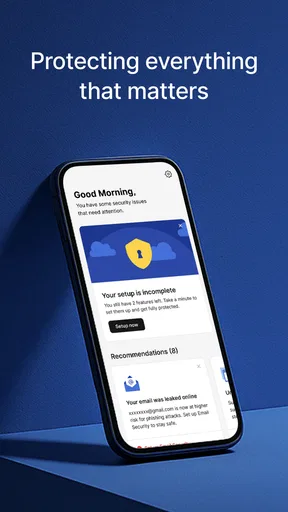
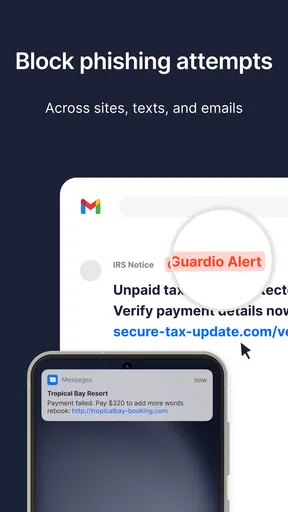

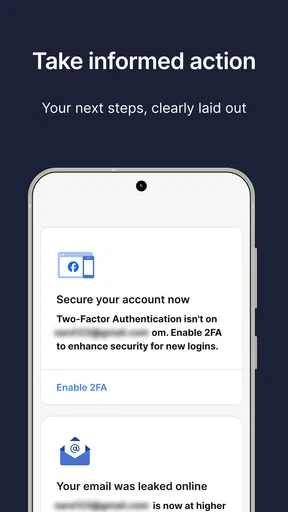



 Analysis by AppCompare
I approached Guardio - Mobile Security as a practical protection tool rather than an app I would open for entertainment. Its focus is browsing and identity protection, so its value appears during ordinary moments: checking a message link, visiting an unfamiliar website, signing up for a service, or trying to decide whether an online request deserves trust. My overall impression is that it is most useful when it adds a pause between a suspicious prompt and an impulsive tap.
The app is free to install, aimed at Everyone, and comes from Guardio. It belongs in the tools category, not in the same group as a full device-cleanup utility or a traditional antivirus suite. That distinction matters. If you want a control panel packed with technical scans, system tuning, and advanced device diagnostics, this may feel narrower. If your main concern is safer everyday browsing and protecting personal identity while moving around the internet, its more focused approach makes sense.
Getting past the first points of friction
The first challenge with a protection app is usually expectation management. People install it after seeing a suspicious text or worrying about a compromised account, then expect an instant answer about every part of their phone. Guardio - Mobile Security is better understood as a companion for online activity. It can help you think more carefully about risky browsing situations, but it should not replace sensible account habits, device updates, or the security tools already built into your phone.
I would begin setup when I have a few quiet minutes, rather than while rushing to open a link. Read each screen carefully and avoid approving anything you do not understand. Security apps often need the user to make choices about how they fit into daily browsing, and skipping those explanations can create confusion later. A calm setup also makes it easier to recognize what the app is actually doing instead of assuming that every warning, notification, or blocked page comes from the same source.
A useful early check is whether the app is suitable for the phone itself. Guardio lists Android 10 as the minimum operating system, so an older device may not be a good candidate. On a compatible phone, I would update the operating system first, restart the device, and then install the current release, version 2026.95.0. That simple order avoids wasting time troubleshooting an app on a phone that is already behind on basic system maintenance.
Another setup mistake is treating a security warning as proof that the entire phone has been taken over. A warning about a website or identity-related risk usually calls for a careful look at the specific situation. I would close the questionable page, avoid entering passwords or payment details, and inspect the message or address that led there. The app can be part of that process, but the safest response still depends on what happened outside the app.
Checks I would make before blaming the app
If something does not appear to work, I would first confirm that the phone has a reliable connection and that ordinary pages load normally. A protection tool cannot evaluate a browsing event properly if the device is offline, switching repeatedly between networks, or operating under an unusually restrictive connection. I would also check that the app is updated, the phone has been restarted recently, and there is enough free storage for normal operation.
Worth Reading Before You Choose

EA SPORTS FC Mobile 26 Is a Bigger Football Game, but It Takes Time

Flipboard Shows What News Apps Must Do Beyond the Feed

Switching to Android Auto Means Rethinking Your Driving Routine

Google Calendar Makes a Crowded Week Easier to Manage

Ludo King Makes the Most of the Minutes Between Plans

Baby Panda World Brings Quick Play to Modern Phones, but Its Game Library Feels Busy
I would then repeat the same action in a controlled way. For example, if a page did not seem to receive protection, I would close it, reopen the browser, and try a known-safe website before testing the original address again. This separates a general browsing problem from an issue tied to one page. It also prevents a common mistake: repeatedly opening a suspicious link just to see whether the warning appears.
Notifications deserve a similar check. If I am waiting for an alert, I would review the phone’s notification controls and battery-saving behavior rather than assuming the app has failed. Aggressive background restrictions can delay many kinds of alerts. The exact menus differ between phone makers, so I would look for the app under notification and battery settings, make sure important alerts are not being silenced, and avoid changing several unrelated settings at once.
There is also a privacy trade-off worth considering before installation. Any app connected to browsing or identity protection needs to be judged not only by the warnings it provides, but also by whether its role fits your comfort level. I would read the permission explanations and privacy information shown during setup, then decide whether the protection is worth the access requested. That is a more useful question than simply asking whether the app has many tools.
Recovering when a normal workflow breaks
One realistic situation is receiving a message that appears to come from a delivery company, a bank, or a social service. I might tap it before noticing that the wording feels wrong. If the page behaves strangely, the recovery workflow should be simple: stop typing, close the page, and do not download anything from it. I would open the relevant service through its official app or a manually entered address instead of returning through the message.
If I had already entered a password, I would change it from a trusted route and make sure the new password is not reused elsewhere. If the information involved a financial account, I would contact the institution through a known official channel. Guardio can help me recognize the risky browsing moment, but it cannot undo information that has already been submitted. This is one of the most important limits to understand before relying on any security app.
When Guardio - Mobile Security appears stuck, I would use a gradual recovery sequence. First, leave the affected page and reopen the browser. Next, restart the phone. Then check for an app or operating-system update. Only after those steps would I consider reinstalling the app, because reinstalling too early can erase useful context and make it harder to identify the original problem. I would also avoid installing several competing security products at the same time while troubleshooting; overlapping protection can make alerts and browser behavior harder to interpret.
If one website is repeatedly flagged, I would not keep forcing it open to prove a point. I would verify the organization independently, search for its official contact route, and compare the address carefully. A familiar logo is not enough. Look for spelling changes, unusual domains, urgent requests, and forms asking for information that the service normally would not need. The best use of a warning is to trigger verification, not to start a debate with the warning.
There is a second recovery case that is less dramatic but common: the app seems quiet, so the user assumes it is useless. Protection tools are often most valuable when they prevent a risky action without demanding attention. I would not judge it by how many alerts appear. Instead, I would ask whether it fits the way I browse, whether it gives understandable guidance when something feels unsafe, and whether it helps me make better decisions without creating constant interruptions.
When the app is not the real cause
Not every failed login, slow page, or missing message is a security event. A website may be down, a browser session may be stale, or a service may reject a request because of its own account rules. Before changing security settings, I would test another ordinary website and, if appropriate, another connection. If only one service fails, the problem may belong to that service rather than to Guardio.
Phone-level problems can also look like app problems. An outdated operating system, nearly full storage, extreme battery saving, or a browser that has not been updated can affect the entire browsing experience. I would compare behavior with the app closed, but I would not interpret one quick test as a definitive diagnosis. Security behavior can depend on the page, browser, connection, and timing of the event.
False alarms are another reason to use judgment. A warning does not automatically mean that a legitimate company is malicious, just as the absence of a warning does not make every page trustworthy. I would treat an alert as a reason to stop and verify. For important accounts, I would still use strong unique passwords, available multi-factor protection, and official applications or manually entered addresses. Guardio works best as an additional layer, not as permission to lower those standards.
This is also where the app differs from common alternatives. A browser’s built-in warnings are convenient because they require no extra installation, while a conventional antivirus product may concentrate more heavily on files, applications, and device scanning. Guardio’s appeal is its emphasis on the browsing and identity side of risk. That focus can be easier for a less technical user to understand, but it may feel limited to someone looking for a broad, all-purpose security dashboard.
Families should think about the same distinction. The Everyone content rating makes the app broadly approachable, but an age label does not teach a child how to handle a fake giveaway, a direct message, or a request for a password. I would pair the app with clear household rules: do not respond to urgent requests, do not install something because a page demands it, and ask before entering personal information. The human conversation remains more important than the warning screen.
Who will get the most from it
I can see Guardio - Mobile Security fitting people who spend a lot of time following links from messages, social networks, email, and search results. It is also a reasonable choice for someone who wants a clearer security companion without learning a large collection of technical controls. The app has reached over a million installs, with an average rating of 4.2 from roughly twenty-five thousand ratings, so it has attracted a substantial audience without that making it automatically right for every phone.
I would be more cautious if my main need were offline malware analysis, detailed network inspection, enterprise management, or advanced device diagnostics. In those cases, a security product designed specifically around that job would be a better match. I would also skip it if I dislike reviewing setup choices or if I already have a trusted security arrangement that covers the same browsing and identity concerns. Adding another layer is not automatically an improvement when it creates duplicated alerts or uncertainty.
The free entry point makes it easy to test the basic experience without committing immediately. There are in-app purchases priced at $14.99 per item, so I would inspect the exact upgrade screen and decide whether a paid option solves a problem I actually have. I would not subscribe simply because a warning feels alarming. A useful purchase should provide a clear benefit for my own browsing habits, not just reassurance in the moment.
For a less technical relative, I would set it up together rather than remotely telling them to tap through every prompt. I would explain what a warning means, where to find official support for important accounts, and why the app cannot recover a password that was voluntarily entered on a fake page. That short lesson can prevent more trouble than installing any single tool.
My practical verdict after using it as a daily safeguard
My recommendation is positive, with a defined scope. Guardio - Mobile Security makes sense when browsing and identity protection are the problems I want to address. Its strongest quality is not that it turns a phone into an impenetrable device; it is that it encourages a safer decision at the exact moment an online request feels urgent or unfamiliar.
The setup deserves patience, and troubleshooting should begin with the phone, browser, connection, and notification settings before the app is blamed. I would also keep expectations realistic: no protection layer replaces careful account recovery, unique passwords, official contact routes, and skepticism toward unexpected requests. Those habits are especially important after a warning, because the warning is only useful if I respond correctly.
My bottom line: choose it for focused browsing and identity awareness, not as a substitute for every other security measure. At no cost to start and with an Everyone rating, it is approachable for ordinary users who want an extra checkpoint. But people seeking deep technical controls, broad device maintenance, or a single comprehensive security suite should compare it with alternatives built for those jobs. Used within its proper role, Guardio is a practical companion; used as a guarantee, it will disappoint.
Pros
- Blocks malicious websites
- phishing attempts
- and suspicious links while browsing.
- Monitors personal data exposure and alerts you about potential online leaks.
- Scans installed apps for risky behavior and suspicious permissions.
- Includes identity theft support to help users respond to security incidents.
- Simple interface makes security checks and alerts easy to understand.
Cons
- Many advanced protection features require a paid subscription.
- Some security tools may use noticeable battery or background data.
- Privacy monitoring depends on the availability of supported data sources.
- Alerts can occasionally feel frequent when browsing unfamiliar websites.
- Full protection may require enabling several permissions and accessibility settings.
FAQs for Guardio - Mobile Security
What is Guardio - Mobile Security, and what does it do?
Guardio - Mobile Security is designed to help protect your phone and online activity from common digital threats. Its features may include suspicious-link detection, scam and phishing warnings, browser protection, data-breach monitoring, and alerts about potentially unsafe websites or applications. It is best viewed as an additional security layer rather than a complete replacement for safe browsing habits, official app stores, and the built-in security tools on Android or iOS.
Is Guardio - Mobile Security free to use?
Guardio may offer a free installation or limited free features, while more advanced protection can require a subscription or trial plan. Before activating a trial, check the pricing, renewal terms, billing frequency, and cancellation instructions shown in the app store or during signup. Some security features may be restricted by platform, region, or plan, so users should review the current offer carefully before entering payment details.
Does Guardio slow down the phone or drain the battery?
In normal use, Guardio is intended to run quietly in the background and provide alerts when it detects a suspicious website, link, or security concern. However, any security application that monitors browsing, notifications, or device activity can use some battery, memory, and mobile data. The effect depends on your phone, operating-system permissions, and enabled features. If battery usage becomes noticeable, review Guardio’s settings and your system’s battery report.
Is Guardio - Mobile Security available for both Android and iPhone?
Guardio’s availability and feature set can differ between Android and iOS because the two platforms provide different permissions and security controls. Some functions may work directly inside a browser, while others may require a separate app, browser extension, or notification permission. Before downloading, confirm that your device and operating-system version are supported in the official Google Play Store or Apple App Store listing.
Can Guardio completely protect me from viruses, scams, and phishing attacks?
No security app can guarantee complete protection against every threat. Guardio can help identify suspicious links, fraudulent websites, compromised accounts, and other warning signs, but users still need to verify messages, avoid unknown downloads, use strong unique passwords, enable two-factor authentication, and keep the operating system updated. Treat Guardio’s warnings as helpful guidance, not as permission to ignore basic online-safety practices.


